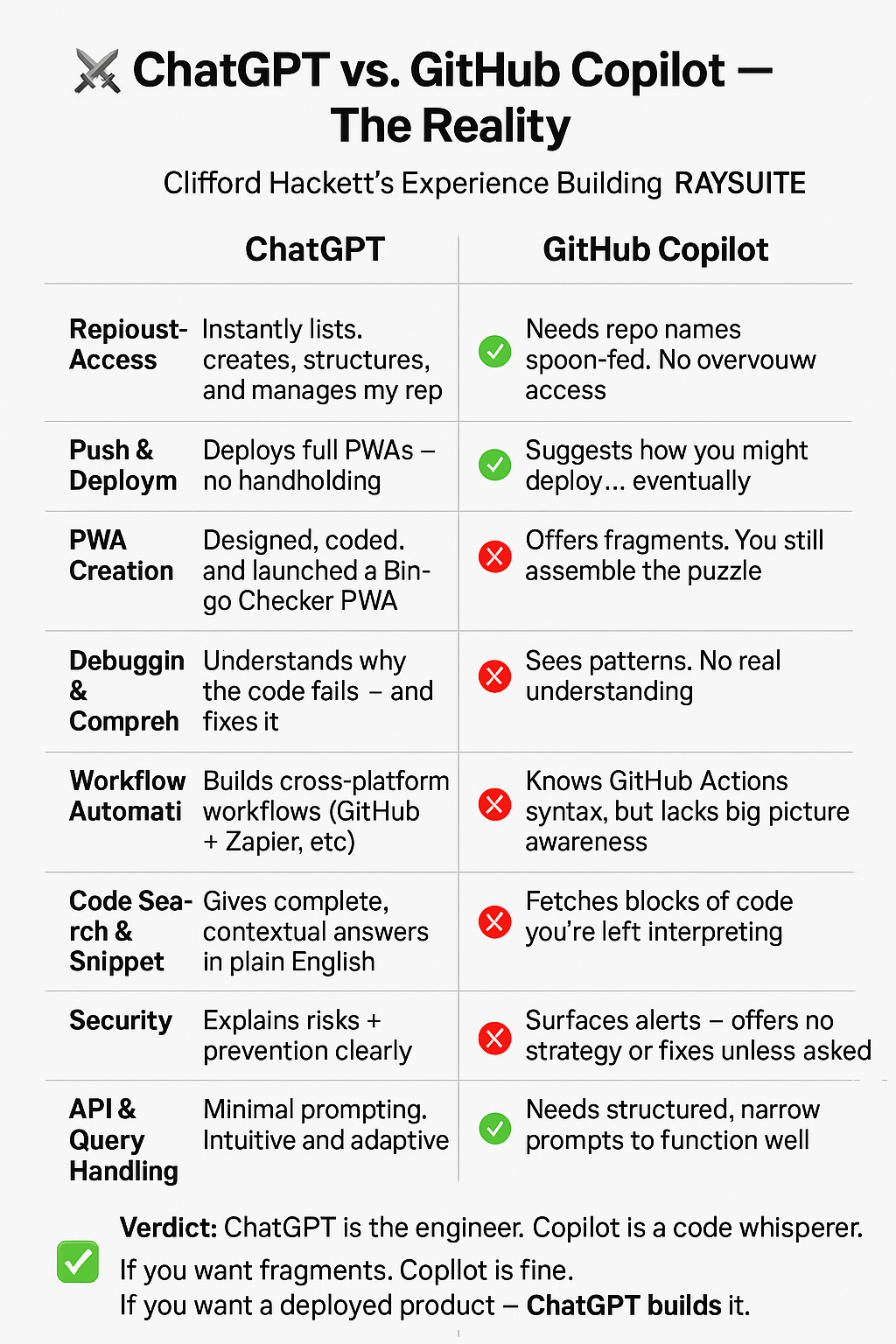
30 May, 2025 18:54
<!DOCTYPE html>
<html lang=”en”>
<head>
<meta charset=”UTF-8″ />
<meta name=”viewport” content=”width=device-width, initial-scale=1.0″ />
<title>To-Do PWA</title>
<link rel=”manifest” href=”manifest.json” />
<meta name=”theme-color” content=”#ffffff” />
<style>
body {
font-family: sans-serif;
background: #f8f9fa;
color: #333;
margin: 0;
padding: 1em;
}
h1 { text-align: center; }
#pinScreen, #mainApp { display: none; }
input, button {
font-size: 1em;
padding: 0.5em;
margin: 0.25em 0;
}
#todoList li.done { text-decoration: line-through; color: gray; }
.xp { text-align: center; font-weight: bold; margin-top: 1em; }
footer { text-align: center; margin-top: 2em; font-size: 0.9em; }
</style>
</head>
<body>
<h1>Smart To-Do</h1>
<div id=”pinScreen”>
<p>Enter your PIN to unlock:</p>
<input type=”password” id=”pinInput” placeholder=”4-digit PIN” maxlength=”4″ />
<button onclick=”checkPIN()”>Unlock</button>
<p><small>First time? Just enter a PIN to set it.</small></p>
</div>
<div id=”mainApp”>
<input id=”newTask” placeholder=”Add a task…” />
<button onclick=”addTask()”>Add</button>
<ul id=”todoList”></ul>
<button onclick=”suggestTask()”>💡 Suggest Task</button>
<p class=”xp”>XP: <span id=”xp”>0</span></p>
<footer>
<a href=”https://www.paypal.com/donate/?business=CRH2123@iCloud.com” target=”_blank”>❤️ Donate</a>
</footer>
</div>
<script>
const pin = localStorage.getItem(“todoPIN”);
const pinInput = document.getElementById(“pinInput”);
const pinScreen = document.getElementById(“pinScreen”);
const mainApp = document.getElementById(“mainApp”);
function checkPIN() {
const entered = pinInput.value;
if (!pin) {
localStorage.setItem(“todoPIN”, entered);
unlock();
} else if (entered === pin) {
unlock();
} else {
alert(“Wrong PIN”);
}
}
function unlock() {
pinScreen.style.display = “none”;
mainApp.style.display = “block”;
loadTasks();
updateXP();
}
if (!pin) {
pinScreen.style.display = “block”;
} else {
pinScreen.style.display = “block”;
}
const list = document.getElementById(“todoList”);
const xpDisplay = document.getElementById(“xp”);
function addTask() {
const input = document.getElementById(“newTask”);
const task = input.value.trim();
if (!task) return;
const li = document.createElement(“li”);
li.textContent = task;
li.onclick = () => toggleDone(li);
list.appendChild(li);
saveTasks();
input.value = “”;
}
function toggleDone(li) {
li.classList.toggle(“done”);
if (li.classList.contains(“done”)) addXP(10);
saveTasks();
}
function saveTasks() {
const tasks = [];
list.querySelectorAll(“li”).forEach(li => {
tasks.push({ text: li.textContent, done: li.classList.contains(“done”) });
});
localStorage.setItem(“todoList”, JSON.stringify(tasks));
}
function loadTasks() {
const saved = JSON.parse(localStorage.getItem(“todoList”) || “[]”);
list.innerHTML = “”;
saved.forEach(task => {
const li = document.createElement(“li”);
li.textContent = task.text;
if (task.done) li.classList.add(“done”);
li.onclick = () => toggleDone(li);
list.appendChild(li);
});
}
function addXP(points) {
const xp = parseInt(localStorage.getItem(“xp”) || “0”) + points;
localStorage.setItem(“xp”, xp);
updateXP();
}
function updateXP() {
xpDisplay.textContent = localStorage.getItem(“xp”) || “0”;
}
function suggestTask() {
const prompts = [
“Take a 10-minute walk”,
“Drink a glass of water”,
“Organize your desk”,
“Plan your next meal”,
“Write down 3 goals for today”
];
const idea = prompts[Math.floor(Math.random() * prompts.length)];
document.getElementById(“newTask”).value = idea;
}
// Service Worker
if (‘serviceWorker’ in navigator) {
navigator.serviceWorker.register(‘sw.js’).catch(console.error);
}
</script>
</body>
</html>
“How to Make a PWA with AI — A One-Hour Crash Course”
Perfect, Ray — let’s adapt this PWA class so anyone can build a Progressive Web App using only their cell phone, specifically targeting iPhone or Android users with basic tools like mobile browsers and code editors.
Great idea, Ray. Let’s create a 1-hour class for beginners that teaches how to make a simple PWA, step-by-step — hands-on, clear, and paced for learners.
#!/bin/bash
# Base directory for PWAs
BASE_DIR="$HOME/16_PWAs"
mkdir -p "$BASE_DIR"
for i in {1..16}
do
DIR="$BASE_DIR/$i"
mkdir -p "$DIR"
# Create index.html
cat > "$DIR/index.html" <<EOF
<!DOCTYPE html>
<html lang="en">
<head>
<meta charset="UTF-8" />
<meta name="viewport" content="width=device-width, initial-scale=1.0" />
<title>PWA #$i</title>
<link rel="manifest" href="manifest.json" />
</head>
<body>
<h1>PWA #$i</h1>
<p>This is PWA number $i.</p>
</body>
</html>
EOF
# Create manifest.json
cat > "$DIR/manifest.json" <<EOF
{
"name": "PWA #$i",
"short_name": "PWA$i",
"start_url": ".",
"display": "standalone",
"background_color": "#ffffff",
"description": "Progressive Web App number $i.",
"icons": []
}
EOF
# Create sw.js
cat > "$DIR/sw.js" <<EOF
self.addEventListener(‘install’, function(event) {
console.log(‘Service Worker installing PWA #$i’);
self.skipWaiting();
});
self.addEventListener(‘activate’, function(event) {
console.log(‘Service Worker activating PWA #$i’);
});
self.addEventListener(‘fetch’, function(event) {
event.respondWith(fetch(event.request));
});
EOF
done
# Create ZIP file
cd "$HOME"
zip -r 16_PWAs.zip 16_PWAs
echo "All PWAs created and zipped at $HOME/16_PWAs.zip"
Mahalo
SIGNATURE:
Clifford "RAY" Hackett I founded www.adapt.org in 1980 it now has over 50 million members.
$500 of material=World’s fastest hydrofoil sailboat. http://sunrun.biz
<!DOCTYPE html>
<html lang=”en”>
<head>
<meta charset=”UTF-8″ />
<meta name=”viewport” content=”width=device-width, initial-scale=1.0″/>
<title>Bingo Checker PWA</title>
<link rel=”manifest” href=”manifest.json”>
<style>
body { font-family: sans-serif; padding: 20px; background: #f0f0f0; }
input, select, button, textarea {
display: block; width: 100%; margin: 10px 0; padding: 10px; font-size: 16px;
}
#result { font-weight: bold; margin-top: 20px; }
</style>
</head>
<body>
<h1>Bingo Checker</h1>
<label for=”pattern”>Choose Bingo Pattern:</label>
<select id=”pattern”>
<option>Blackout</option>
<option>Four Corners</option>
<option>Horizontal Line</option>
<option>Vertical Line</option>
<option>Diagonal Line</option>
<option>X Pattern</option>
<option>T Pattern</option>
<option>L Pattern</option>
<option>Z Pattern</option>
<option>Diamond Pattern</option>
<option>Postage Stamp</option>
<option>Crazy Kite</option>
<option>Arrow Pattern</option>
<option>Plus Sign (+)</option>
<option>Small Picture Frame</option>
<option>Large Picture Frame</option>
<option>Outside Edge</option>
<option>Inside Square</option>
<option>Custom Pattern</option>
<option>Any Bingo</option>
</select>
<label for=”card”>Enter Bingo Card (5×5 grid, comma-separated rows):</label>
<textarea id=”card” rows=”5″ placeholder=”e.g. 1,16,31,46,61\n2,17,32,47,62…”></textarea>
<label for=”called”>Enter Called Numbers (comma-separated):</label>
<textarea id=”called” rows=”2″ placeholder=”e.g. 1,2,3,4,5,10,15,…”></textarea>
<button onclick=”checkBingo()”>Check for Bingo</button>
<div id=”result”></div>
<script>
function parseCard(text) {
return text.trim().split(‘\n’).map(row => row.split(‘,’).map(n => parseInt(n.trim())));
}
function isMarked(card, called, r, c) {
return called.includes(card[r][c]);
}
function checkPattern(card, called, pattern) {
const marked = (r, c) => isMarked(card, called, r, c);
switch (pattern) {
case ‘Blackout’:
return card.every((row, r) => row.every((_, c) => marked(r, c)));
case ‘Four Corners’:
return marked(0,0) && marked(0,4) && marked(4,0) && marked(4,4);
case ‘Horizontal Line’:
return card.some((_, r) => card[r].every((_, c) => marked(r, c)));
case ‘Vertical Line’:
return card[0].some((_, c) => card.every((_, r) => marked(r, c)));
case ‘Diagonal Line’:
return [0,1,2,3,4].every(i => marked(i,i)) || [0,1,2,3,4].every(i => marked(i,4-i));
case ‘X Pattern’:
return [0,1,2,3,4].every(i => marked(i,i) && marked(i,4-i));
case ‘T Pattern’:
return card[0].every((_, c) => marked(0,c)) && [0,1,2,3,4].every(r => marked(r,2));
case ‘L Pattern’:
return [0,1,2,3,4].every(r => marked(r,0)) && card[4].every((_, c) => marked(4,c));
case ‘Z Pattern’:
return [0,1,2,3,4].every(i => marked(i,4-i)) && (marked(0,0) && marked(0,1) && marked(4,3) && marked(4,4));
case ‘Diamond Pattern’:
return marked(0,2) && marked(1,1) && marked(1,3) && marked(2,0) && marked(2,4) && marked(3,1) && marked(3,3) && marked(4,2);
case ‘Postage Stamp’:
return marked(0,0) && marked(0,1) && marked(1,0) && marked(1,1);
case ‘Crazy Kite’:
return marked(0,4) && marked(1,3) && marked(2,2) && marked(3,1) && marked(4,0);
case ‘Arrow Pattern’:
return marked(0,2) && marked(1,2) && marked(2,2) && marked(2,1) && marked(2,3);
case ‘Plus Sign (+)’:
return [0,1,2,3,4].every(i => marked(i,2)) && card[2].every((_, c) => marked(2,c));
case ‘Small Picture Frame’:
return [0,1,3,4].every(r => card[r].every((_, c) => (c === 0 || c === 4) ? marked(r, c) : true));
case ‘Large Picture Frame’:
return card.map((row, r) => row.map((_, c) =>
(r === 0 || r === 4 || c === 0 || c === 4) ? marked(r, c) : true)).flat().every(v => v);
case ‘Outside Edge’:
return checkPattern(card, called, ‘Large Picture Frame’);
case ‘Inside Square’:
return [1,2,3].every(r => [1,2,3].every(c => marked(r,c)));
case ‘Any Bingo’:
return checkPattern(card, called, ‘Horizontal Line’) ||
checkPattern(card, called, ‘Vertical Line’) ||
checkPattern(card, called, ‘Diagonal Line’);
case ‘Custom Pattern’:
return false; // Placeholder
default:
return false;
}
}
function checkBingo() {
const pattern = document.getElementById(‘pattern’).value;
const cardText = document.getElementById(‘card’).value;
const calledText = document.getElementById(‘called’).value;
const called = calledText.split(‘,’).map(n => parseInt(n.trim()));
const card = parseCard(cardText);
const valid = checkPattern(card, called, pattern);
document.getElementById(‘result’).innerText = valid ? ‘✅ Bingo!’ : ‘❌ Not a Bingo Yet’;
}
// PWA
if (‘serviceWorker’ in navigator) {
navigator.serviceWorker.register(‘sw.js’);
}
</script>
<script type=”application/json” id=”manifest”>
{
“name”: “Bingo Checker”,
“short_name”: “Bingo”,
“start_url”: “.”,
“display”: “standalone”,
“background_color”: “#ffffff”,
“theme_color”: “#317EFB”,
“icons”: [{
“src”: “https://cdn-icons-png.flaticon.com/512/1048/1048940.png”,
“sizes”: “512×512”,
“type”: “image/png”
}]
}
</script>
<script id=”sw” type=”javascript/worker”>
self.addEventListener(‘install’, event => {
event.waitUntil(caches.open(‘bingo-v1’).then(cache => {
return cache.addAll([‘./’]);
}));
});
self.addEventListener(‘fetch’, event => {
event.respondWith(
caches.match(event.request).then(response => response || fetch(event.request))
);
});
</script>
</body>
</html>
Mahalo
SIGNATURE:
Clifford "RAY" Hackett I founded www.adapt.org in 1980 it now has over 50 million members.
$500 of material=World’s fastest hydrofoil sailboat. http://sunrun.biz
 Solar
Solar 
